Loading... Please wait...
Categories
 New Products
-
£66.96£46.96
-
£213.46£153.46
-
£271.66£201.66
-
£134.99£94.99
-
£72.97£52.97
Our Newsletter
- Home
- Computers & Laptops
- Motherboard in UK
- GIGABYTE Motherboards UK
- GIGABYTE A620M DS3H Micro ATX AMD Socket AM5 Motherboard UK
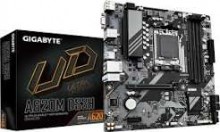
GIGABYTE A620M DS3H Micro ATX AMD Socket AM5 Motherboard UK


Product Description
Durable Performance
GIGABYTE Ultra Durable™ motherboards built with optimal components inside out provide the prime performance and timeless platform.
Future Connectivity
The ultimate connectivity with blazing data-transfer speeds through the next generation network and storage.
GbE LAN with Bandwidth Management
GbE LAN features a network bandwidth management application which helps to improve network latency and maintain low ping times to deliver better responsiveness in crowded LAN environments.
PCIe 4.0 Hardware Design
GIGABYTE A620 Motherboards are ready to work with the PCIe 4.0 devices which are expected to experience twice bandwidth than the current PCIe 3.0 devices. To reach the high speed and maintain good signal integrity, GIGABYTE R&D uses the low impedance PCB to provide the maximum performance.
Easy Friendly
Innovative and intuitive hardware, software, and BIOS interface design to create your personal style.
Q-Flash Plus
Update the BIOS easily without installing the CPU, memory and graphics card. With GIGABYTE Q-Flash Plus, you don't need to install the CPU, memory and graphics card nor enter the BIOS menu to flash the BIOS. Just download and save a new BIOS file (rename to gigabyte.bin) on the USB flash drive, then press the dedicated Q-Flash Plus button and youre good to go!
STEP 1: Plug 24pin & 8pin power supply cable on motherboard
STEP 2: Download motherboard BIOS file and rename to ""gigabyte.bin"", save to USB flashdrive, and plug USB flashdrive into Q-Flash USB port
STEP 3: Press Q-Flash Plus button, and motherboard will start updating BIOS automatically.
A620M DS3H
AMD Socket AM5Supports AMD Ryzen™ 7000/ Ryzen™ 8000/ Ryzen™ 9000 Series Processors
Unparalleled Performance5+2+2 Phases Digital VRM Solution
Dual Channel DDR54*SMD DIMMs with AMD EXPO™ & Intel® XMP Memory Module Support
SuperSpeed StoragePCIe 4.0 x4 M.2 Connector
EZ-LatchPCIe x16 Slot with Quick Release Design
Fast NetworksGbE LAN
Extended ConnectivityDP, HDMI, D-Sub
Smart Fan 6Features Multiple Temperature Sensors, Hybrid Fan Headers with FAN STOP
Q-Flash PlusUpdate BIOS Without Installing the CPU, Memory and Graphics Card